arma 3 on linux
2025-07-27
how to get arma 3 running on linux with radio mods
I use nixos, but this should work everywhere that steam can be installed.
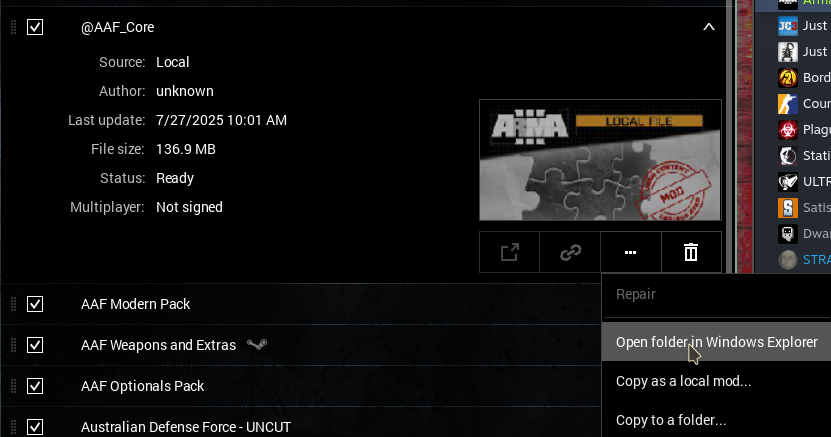
Install arma, and download the teamspeak 3 installer. Launch Arma until the launcher. Go to the mods tab and subscribe to a mod if you have not done so already, click the little arrow, then the three drops and select "Open folder in Windows Explorer". This will open a WINE explorer thing, you can launch executables that will run in the same wine instance, using the same wine server from here.
Now, run the teamspeak 3 installer, install for all users and remember to uncheck the overwolf thing, once it finished, close Teamspeak. Now you should just be able to launch the game, and for ACERE2 at least, it will install the plugin automatically. I am unsure of what will happen if you use something else, but you can just follow it's guide for installing the plugin. To launch teamspeak again, open the explorer and run C:/Program Files/TeamSpeak 3 Client/ts3client_win64.exe
bonus performance things
In the arma 3 launcher, under parameters, turn on the following:
- Basic
- Show static background in menu: true
- Skip logos at startup: true
- Force window mode: true
- Advanced
- Extra Threads: true
- File operations: true
- Texture loading: true
- Geometry loading: true
- No logs: true (this is probably really minimal on performance increase, so maybe don't bother because you may need the logs)
- Extra Threads: true
bonus troubleshooting step
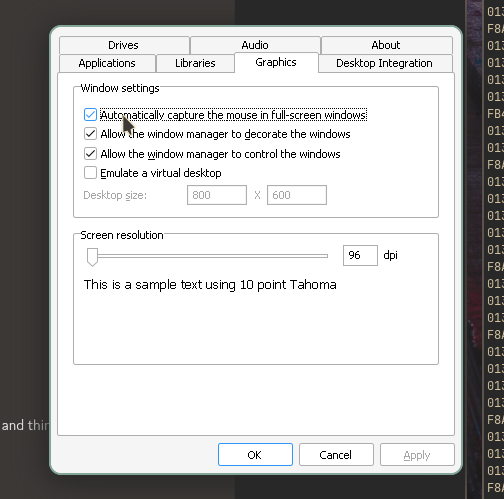
The game may not lock your mouse to the window, if this is the case run protontricks, select Arma, select the default wine prefix, and run winecfg. In winecfg enable "automatically capture the mouse in full-screen windows". This should hopefully fix it for you, it did for me.
bonus extra resources!
- Some people have had setting the game to borderless window fix the mouse exiting the window
- arma-3-unix-launcher
- Steam tinker launch is a much better way to do this automatically, but is a bit jank so I do not tend to use it